Steel erection teams have historically treated the bill of lading as a paper trail - something to file after a truck pulls away. That habit is expensive. When a structural piece shows up on a BOL but never makes it to the BIM model, or when a load gets counted twice because a duplicate slips through, the downstream problems compound: out-of-sequence work, missed floor closes, and schedule overruns that could have been caught at the gate.
This guide explains how project managers and site superintendents can close that gap - using BOL tracking to reconcile every delivery against the model, confirm install-ready materials floor by floor, and tighten construction site logistics before problems surface in the field. It draws on how Versatile AI's material tracking pipeline handles this process on active steel erection sites today.
What Is a Bill of Lading and Why Does It Matter for Steel Erection?
A bill of lading (BOL) is a shipping document that lists every piece a fabricator sends on a given truck: piece marks, quantities, weights, load number, and delivery date. On a steel erection site it is the handoff record between the fabricator's yard and your ironworkers.
The problem is that a BOL is only as useful as your ability to reconcile it against reality. Most teams scan or photograph the document and store it - they don't systematically match each line item to the BIM model, flag unmatched marks, or connect delivery status to installation progress. That disconnect leaves project managers guessing which pieces are on site, which are in the trailer yard, and which were never shipped.
Modern delivery tracking on steel erection sites closes this gap by treating the BOL not as an archive document but as a live reconciliation tool.
Step 1: Capture and Extract BOL Data at the Gate
Verification starts the moment a truck arrives. The goal is to digitize the BOL while the driver is still on site, not hours later in the trailer.
What to do:
- Scan or photograph every page of the BOL immediately on receipt.
- Upload to your material tracking system before the truck leaves the gate. In Versatile AI, this goes directly into the BOL Archive, where the document is queued for extraction immediately.
- Confirm the system returns a validation status - Validated, Validation Failed, or a duplicate flag - before moving on.
Why validation status matters:
A validated BOL means the system successfully extracted the fabricator name, load number, delivery date, and all line items (piece marks, quantities, weights) and confirmed the header is structurally sound. A validation failure typically means the scan was illegible or the header was malformed. Those BOLs need a human review before any pieces from that load get credited as delivered.
A common mistake is treating a failed BOL as a minor admin issue. If the pieces from that load proceed into the field without a valid BOL record, you lose traceability for those marks entirely.
Step 2: Match BOL Line Items to the BIM Model
Capturing the BOL is the easy part. The high-value step is matching each piece mark on the BOL to its corresponding element in the structural model.
How piece matching works:
Each line item on a BOL carries a piece mark - an identifier like 29C1 or W14x53 - that corresponds to a specific element in your BIM model. Versatile AI automatically compares those marks against the structural model and flags:
- Matched pieces - mark found in the model, delivery confirmed
- Unmatched marks - on the BOL but not in the model (possible fabrication error, wrong site, or mark mismatch)
- Model pieces with no BOL - in the model but not yet delivered
This three-way view is what gives a superintendent actionable information. An unmatched mark on a BOL warrants a call to the fabricator before that piece gets lifted. A model piece with no BOL record is a gap in your delivery schedule, not a surprise.
Watch for duplicate BOLs:
Versatile AI flags potential duplicates automatically - cases where the same load number or the same combination of fabricator, delivery date, and piece marks appears more than once. Always surface these flags in your daily delivery review. Duplicate BOLs that go uncaught inflate your delivered piece counts and create phantom inventory that will eventually cause a sequence conflict.
Step 3: Confirm Install-Ready Status by Floor
Delivery tracking on steel erection sites is not complete when the BOL is matched. Pieces that have arrived on site can sit in the trailer yard for days or weeks before they're lifted. The question a superintendent needs to answer every morning is: which pieces are here and ready, and which floor are they going to?
Versatile AI connects BOL data to installation status to give you exactly this view, updated in real time as pieces are scanned and lifted.
What to look for:
For each piece that has a matched BOL record, check its current installation status:
| Status | Meaning |
|---|---|
| Not Erected | Piece arrived on site per BOL, not yet lifted |
| In Progress | Piece is in the process of being set |
| Erected / Done | Piece confirmed in final position |
Sorting this view by floor - and by the floor's numeric sequence - tells you which floors have full sets of pieces available for lift sequences and which are still waiting on deliveries.
A floor that shows 80% delivered but 0% installed is a logistics flag, not a schedule confidence signal. It means material is on site but something is blocking installation - sequencing, connections, or access. Catching that early is the difference between a replan that costs an afternoon and one that costs a week.
Step 4: Run a Daily Delivery Reconciliation
The most effective teams build a short daily BOL reconciliation into the superintendent's morning routine. It takes less than ten minutes and eliminates the most common sources of delivery surprise.
Daily checklist:
- Review yesterday's BOLs - confirm all scans have returned a Validated status. Follow up on any that failed.
- Check for potential duplicates - resolve any flagged loads before they propagate into piece counts.
- Verify new piece matches - confirm that all line items from yesterday's deliveries matched to the model. Escalate unmatched marks to the fabricator.
- Update install-ready inventory by floor - identify which floors now have complete sets and are cleared for lift sequences.
- Cross-reference against the delivery schedule - flag any loads that were expected but didn't arrive.
This routine works best when the delivery monitoring data is visible to both the site superintendent and the project manager in real time, so field observations and office schedule updates stay synchronized.
Step 5: Track BOL Validation Throughput
On high-volume sites, BOL processing speed itself becomes a logistics variable. If your team is scanning 15–20 loads a week, knowing how long it takes to go from scan to validated record tells you how much of your delivery tracking is running in real time versus catching up.
Validation time - the window between when a BOL is scanned and when it returns a Validated status - should typically close within minutes for a clean scan. Validation times stretching into hours signal a queue problem or a pattern of poor scan quality that needs a corrective process.
Monitoring this metric by site gives operations managers an early signal on which sites need better scan discipline or more tagger bandwidth before it affects field productivity.
Common BOL Tracking Mistakes on Steel Erection Sites
Counting model pieces instead of BOL quantities. A single piece mark on a BOL can represent multiple members (e.g., qty = 6). If your tracking system counts distinct model IDs where a match exists rather than summing BOL quantities, you will systematically undercount deliveries. Always reconcile against BOL line item quantities, not model product counts.
Ignoring illegible scans. A BOL that fails validation is not just an admin inconvenience - it is a gap in your delivery record. Every scan that comes back as illegible should trigger a re-scan or a manual entry before the shift ends.
Treating delivered and install-ready as the same thing. Pieces that appear on a validated BOL have been confirmed as received. They have not necessarily been sorted, sequenced, or positioned for lift. Delivery monitoring and installation tracking need to stay connected for the distinction to be visible.
Skipping the duplicate check. Duplicate BOLs are common on busy sites, especially when multiple people are scanning the same load at different checkpoints. Automated duplicate detection is a starting point - a human review step should still be part of the daily reconciliation.
What Good BOL Tracking Looks Like in Practice
On well-run steel erection sites, the BOL process runs like this:
A truck arrives and the BOL is scanned within minutes. The material tracking system extracts the load details and returns a validated status. Each piece mark is automatically matched against the BIM model and flagged if no match is found. By the time the morning standup starts, the superintendent has a current view of what arrived, what matched, what is on site by floor, and what is still outstanding against the delivery schedule.
That real-time picture - BOL data reconciled to the model and connected to installation status - is what separates reactive steel erection management from proactive construction site logistics.
How Versatile AI Automates This Workflow
Versatile AI was built specifically for structural steel erection sites, and its BOL pipeline handles each step in this guide automatically.
When a BOL is scanned and uploaded in the field, Versatile's LLM-powered extraction engine pulls the fabricator name, load number, delivery date, and every line item from the document. The system validates the result and returns a status within minutes: Validated, Validation Failed, or flagged as a potential duplicate. Validated BOLs are immediately visible in the BOL Archive, with a direct link to the original document.
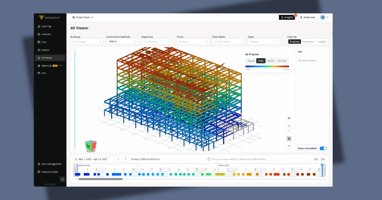
From there, Versatile automatically matches each piece mark on the BOL against the structural model. Project managers and superintendents can see in real time which pieces have been confirmed as delivered, which marks are unmatched, and which model elements still have no BOL record. That matched inventory feeds directly into Craneview, Versatile's field platform, where installation status is tracked piece by piece through the erection cycle.
The result is a continuous loop: every delivery scanned in the field updates the model-level delivery percentage. Every crane lift updates the installation count. Project managers get a live floor-by-floor view of what is on site, what is installed, and what is still in transit, without any manual data entry between the BOL and the BIM.
On sites tracked by Versatile, structural steel delivery rates are measured at the piece-mark level, with some projects reaching 100% BOL-to-model match rates by the time ironwork is complete.
To see how Versatile handles BOL tracking and delivery monitoring on your site, visit versatile.ai.
Frequently Asked Questions
What does a bill of lading include on a steel erection site?
A BOL for a structural steel delivery typically includes the fabricator name, load or truck number, delivery date, and a line-item list of every piece on the truck with its piece mark, quantity, and weight. Some fabricators include sequence numbers and shipping marks tied to the erection drawing set.
How do you reconcile a BOL against a structural model?
Reconciliation means matching each piece mark on the BOL against the corresponding element in the BIM or erection model. Marks that appear on the BOL but not in the model are flagged for investigation. Marks in the model with no BOL record represent pieces not yet delivered.
What is BOL validation in material tracking systems?
BOL validation is the automated process of confirming that a scanned BOL was successfully extracted - fabricator, load number, delivery date, and all line items - and that the header information is structurally valid. A validated BOL can be matched to the model; a failed BOL requires manual review before its pieces are credited as delivered.
How do you identify install-ready steel on a job site?
Install-ready steel is material that has (1) a validated BOL record confirming it was received on site, and (2) a current installation status of Not Installed or In Progress in the tracking system. Sorting this view by floor and sequence tells the erection crew which sets are staged and cleared for lift.
What causes BOL duplicate flags on steel erection sites?
Duplicate BOLs typically occur when the same load is scanned more than once - at the gate and again at the laydown area, for example - or when a fabricator reissues a BOL for a partial re-delivery using the same load number. A material tracking system should flag these automatically; the site team should resolve them before the pieces are counted toward delivery totals.