Progress reports are one of the most important deliverables on a construction project. They're also one of the most painful to produce. The PM spends hours pulling data from the field, reconciling it against the schedule, and assembling something that looks professional enough to send to the owner or GC. By the time the report is finished, it's already out of date.
Automated progress reporting changes the equation. Instead of manually assembling data from multiple sources, the report builds itself from crane activity data that's already being captured. The PM's job shifts from data collection to analysis and decision-making, which is where their time should have been all along.
Why Manual Progress Reporting Breaks Down
The weekly progress report on a steel erection project typically requires the PM to gather information from several places: the foreman's count of what was erected, the superintendent's notes on delays, the schedule to compare planned versus actual, and whatever photos someone remembered to take. Each of those sources has a different level of accuracy, and reconciling them takes real time.
The problems are predictable.
The data is subjective. When the foreman reports "we set 23 pieces today," that number is an estimate. Did it include the piece that was set but not fully connected? The one that was repositioned? The shake-out that wasn't technically erection? Different people count differently, and those differences compound over weeks.
The timeline is approximate. "We started zone 3 on Tuesday" might mean the first piece flew Tuesday morning or that the crane repositioned Tuesday afternoon and the first pick was Wednesday. Without timestamped data, the schedule comparison is approximate at best.
The assembly is manual. Even when the data is good, someone still has to open a spreadsheet, enter the numbers, update the schedule comparison, format the report, and send it out. That process takes a PM anywhere from one to three hours per week, per project. Multiply that across a portfolio, and reporting alone becomes a significant time cost.
"My weekly report used to take 2 hours to put together. Now it basically writes itself." (PM, top-20 GC)
How Automated Progress Reporting Works
Automated progress reporting starts with the data that the crane intelligence system is already capturing from every pick. The system knows which pieces were set, when they were set, and where they were placed in the structure. It validates each pick against the IFC model, so the piece count isn't an estimate. It's a verified record.
From that data, the system generates progress reports that include three things manual reporting can't reliably deliver.
Verified piece counts with timestamps. Every piece that was crane-installed is logged with a timestamp, location, and model validation. The report doesn't say "approximately 23 pieces." It says which 23 pieces, when each one was set, and whether they match the planned sequence. That precision changes how PMs, GCs, and owners read the report.
Schedule comparison that updates automatically. The report maps actual production against the planned schedule without the PM manually entering data into a Gantt chart or spreadsheet. When the plan called for 30 pieces this week and 27 were set, the report shows exactly which three are outstanding and where they fall in the sequence. One superintendent at a national GC called the plan-versus-actual comparison "the game changer," because it replaced subjective schedule conversations with objective data.
Production trends over time. A single week's report shows a snapshot. Automated reporting over multiple weeks shows trajectory. Is production accelerating as the crew finds its rhythm, or decelerating as the structure gets more complex? Are there consistent patterns, like slower production on Mondays or after a trade transition? These trends are invisible in manual reports because nobody has time to plot them.
What Changes for the PM
The PM doesn't stop being involved in progress reporting. The role changes. Instead of spending time collecting data, formatting spreadsheets, and reconciling conflicting numbers, the PM starts with a report that's already accurate and adds the context that only a human can provide: why production slowed in zone 4, what the plan is for recovering the two-day gap in zone 2, and what the GC needs to know about next week's crane move.
This shift matters more than it sounds. A PM who spends two hours assembling a progress report has two fewer hours for the work that actually protects the schedule and the margin: coordinating with the GC, planning ahead with the foreman, reviewing the sequence for next week, and documenting issues that could become claims.
For erectors running multiple projects, the impact multiplies. A PM overseeing three active projects was spending six hours a week just on progress reports. Automated reporting gives those six hours back for project management, which is what the erector is paying the PM to do.
What Changes for the GC and the Owner
Automated progress reporting doesn't just help the erector. It changes the conversation with the GC and the owner.
When the GC asks "are you on schedule?", the answer stops being a judgment call and starts being a data point. The report shows exactly where production stands against the plan, with verified piece counts and timestamps. There's no ambiguity to argue about.
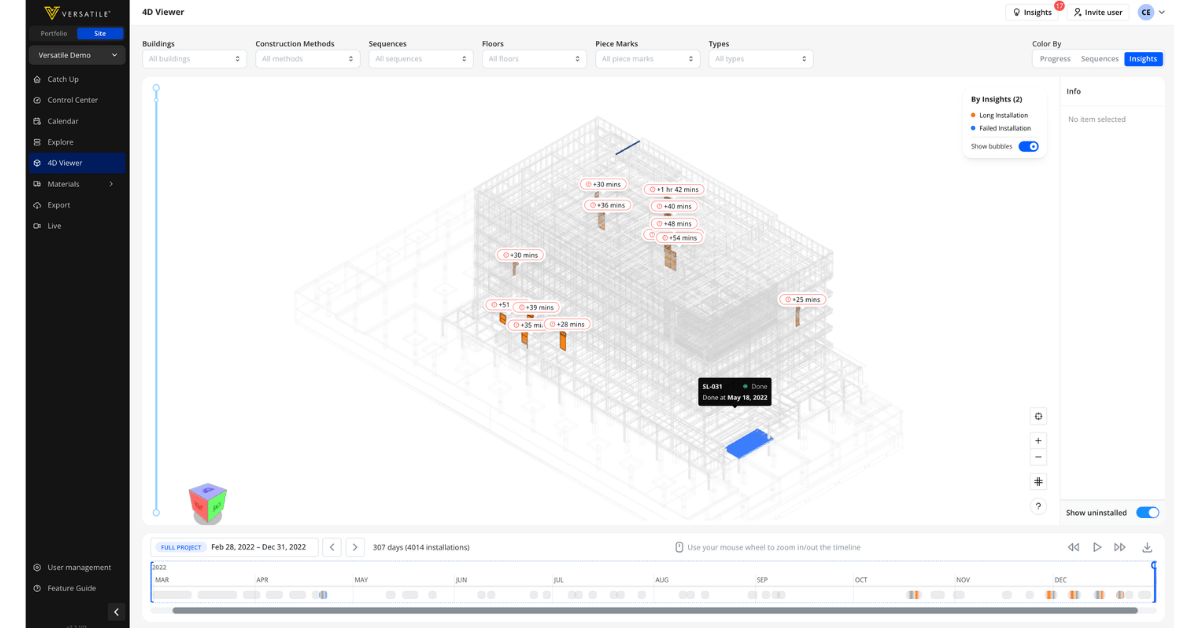
For owners, the progress report becomes something they can actually read and understand. Instead of a dense spreadsheet that requires construction knowledge to interpret, the report shows visual progress on the model, clear schedule comparisons, and production trends that tell a story. One project team started using the automated model view as the centerpiece of owner meetings, letting the owner see progress for themselves instead of relying on slides and verbal summaries.
The documentation value compounds over the life of the project. Every automated report is a timestamped record of what was built and when. If a dispute arises about schedule delays or production rates months later, the progress reports provide objective evidence that didn't require anyone to anticipate the dispute in order to document it.
The Daily Huddle Connection
Progress reporting isn't just a weekly deliverable. The same data that feeds the weekly report also feeds the daily conversation.
When the foreman can see what was installed yesterday, verified against the model and the sequence, the morning planning conversation gets specific fast. Instead of walking the site and piecing together what happened from memory, the crew starts the day knowing exactly where they left off and what comes next. Teams using this data have told us they want a "what was installed yesterday" recap available before the morning huddle, so planning starts from facts instead of recall.
The daily crane report and the weekly progress report are two views of the same underlying data. The daily report drives the tactical conversation: what are we doing today, what do we need, where did we lose time yesterday. The weekly report drives the strategic conversation: are we on schedule, where are we trending, what needs to change. Both are automated. Both start from the same verified production data.
Progress Reporting as Margin Protection
Accurate, automated progress reporting protects margin in ways that go beyond saving the PM's time.
When production data is verified and timestamped, the erector has documentation for every day of the project. If the GC disputes the erector's production rate, the data is there. If weather or other-trade interference caused delays, the reports show exactly when production dropped and by how much. If a change order affected the sequence and slowed production, the before-and-after comparison is built into the reporting history.
Progress tracking that happens automatically creates a paper trail that manual tracking never can, because manual tracking depends on someone having the foresight and the time to document what might matter later. Automated reporting documents everything, and the things that matter surface when you need them.
The progress report is the most-read document on the project. When it's accurate, timely, and objective, it earns trust. When it's late, approximate, and assembled from memory, it creates doubt. Crane intelligence makes the difference between the two by turning every pick into a data point that feeds the report automatically.